


Swap in another LLM
There are several ways to run the same task with a different model. First, create a new chat object with that different model. Here’s the code for checking out Google Gemini 3 Flash Preview:
my_chat_gemini Then you can run the task in one of three ways.
1. Clone an existing task and add the chat as its solver with $set_solver():
my_task_gemini 2. Clone an existing task and add the new chat as a solver when you run it:
my_task_gemini 3. Create a new task from scratch, which allows you to include a new name:
my_task_gemini Make sure you’ve set your API key for each provider you want to test, unless you’re using a platform that doesn’t need them, such as local LLMs with ollama.
View multiple task runs
Once you’ve run multiple tasks with different models, you can use the vitals_bind() function to combine the results:
both_tasks 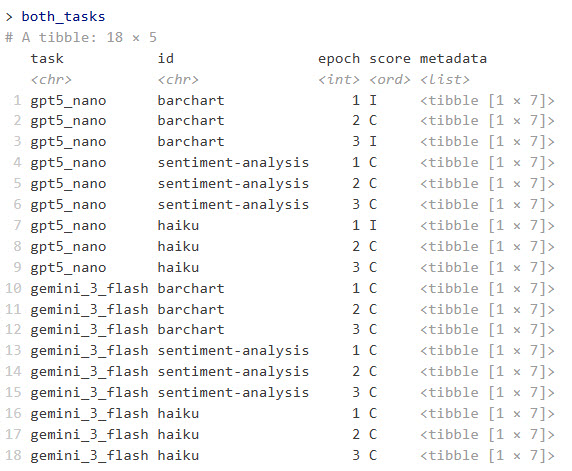
Example of combined task results running each LLM with three epochs.
Sharon Machlis
This returns an R data frame with columns for task, id, epoch, score, and metadata. The metadata column contains a data frame in each row with columns for input, target, result, solver_chat, scorer_chat, scorer_metadata, and scorer.
To flatten the input, target, and result columns and make them easier to scan and analyze, I un-nested the metadata column with:
library(tidyr)
both_tasks_wide
  unnest_longer(metadata) |>
  unnest_wider(metadata)
I was then able to run a quick script to cycle through each bar-chart result code and see what it produced:
library(dplyr)

# Some results are surrounded by markdown and that markdown code needs to be removed or the R code won't run
extract_code
  filter(id == "barchart")

# Loop through each result
for (i in seq_len(nrow(barchart_results))) {
  code_to_run
Test local LLMs
This is one of my favorite use cases for vitals. Currently, models that fit into my PC’s 12GB of GPU RAM are rather limited. But I’m hopeful that small models will soon be useful for more tasks I’d like to do locally with sensitive data. Vitals makes it easy for me to test new LLMs on some of my specific use cases.
vitals (via ellmer) supports ollama, a popular way of running LLMs locally. To use ollama, download, install, and run the ollama application, and either use the desktop app or a terminal window to run it. The syntax is ollama pull to download an LLM, or ollama run to both download and start a chat if you’d like to make sure the model works on your system. For example: ollama pull ministral-3:14b.
The rollama R package lets you download a local LLM for ollama within R, as long as ollama is running. The syntax is rollama::pull_model("model-name"). For example, rollama::pull_model("ministral-3:14b"). You can test whether R can see ollama running on your system with rollama::ping_ollama().
I also pulled Google’s gemma3-12b and Microsoft’s phi4, then created tasks for each of them with the same dataset I used before. Note that as of this writing, you need the dev version of vitals to handle LLM names that include colons (the next CRAN version after 0.2.0 should handle that, though):
# Create chat objects
ministral_chat
All three local LLMs nailed the sentiment analysis, and all did poorly on the bar chart. Some code produced bar charts but not with axes flipped and sorted in descending order; other code didn’t work at all.
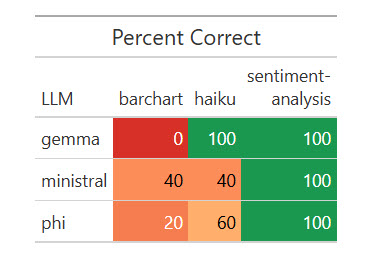
Results of one run of my dataset with five local LLMs.
Sharon Machlis
R code for the results table above:
library(dplyr)
library(gt)
library(scales)

# Prepare the data
plot_data
  rename(LLM = task, task = id) |>
  group_by(LLM, task) |>
  summarize(
    pct_correct = mean(score == "C") * 100,
    .groups = "drop"
  )

color_fn
  tidyr::pivot_wider(names_from = task, values_from = pct_correct) |>
  gt() |>
  tab_header(title = "Percent Correct") |>
  cols_label(`sentiment-analysis` = html("sentiment-
analysis")) |>
  data_color(
    columns = -LLM,
    fn = color_fn
  )
It cost me 39 cents for Opus to judge these local LLM runs—not a bad bargain.
Extract structured data from text
Vitals has a special function for extracting structured data from plain text: generate_structured(). It requires both a chat object and a defined data type you want the LLM to return. As of this writing, you need the development version of vitals to use the generate_structured() function.
First, here’s my new dataset to extract topic, speaker name and affiliation, date, and start time from a plain-text description. The more complex version asks the LLM to convert the time zone to Eastern Time from Central European Time:
extract_dataset R Package Development in Positron\r\nThursday, January 15th, 18:00 - 20:00 CET (Rome, Berlin, Paris timezone) \r\nStephen D. Turner is an associate professor of data science at the University of Virginia School of Data Science. Prior to re-joining UVA he was a data scientist in national security and defense consulting, and later at a biotech company (Colossal, the de-extinction company) where he built and deployed scores of R packages.",
"Extract the workshop topic, speaker name, speaker affiliation, date in 'yyyy-mm-dd' format, and start time in Eastern Time zone in 'hh:mm ET' format from the text below. (TZ is the time zone). Assume the date year makes the most sense given that today's date is February 7, 2026. Return ONLY those entities in the format {topic}, {speaker name}, {date}, {start_time}. Convert the given time to Eastern Time if required. R Package Development in Positron\r\nThursday, January 15th, 18:00 - 20:00 CET (Rome, Berlin, Paris timezone) \r\nStephen D. Turner is an associate professor of data science at the University of Virginia School of Data Science. Prior to re-joining UVA he was a data scientist in national security and defense consulting, and later at a biotech company (Colossal, the de-extinction company) where he built and deployed scores of R packages. "
),
target = c(
"R Package Development in Positron, Stephen D. Turner, University of Virginia (or University of Virginia School of Data Science), 2026-01-15, 18:00. OR R Package Development in Positron, Stephen D. Turner, University of Virginia (or University of Virginia School of Data Science), 2026-01-15, 18:00 CET.",
"R Package Development in Positron, Stephen D. Turner, University of Virginia (or University of Virginia School of Data Science), 2026-01-15, 12:00 ET."
)
)Below is an example of how to define a data structure using ellmer’s type_object() function. Each of the arguments gives the name of a data field and its type (string, integer, and so on). I’m specifying I want to extract a workshop_topic, speaker_name, current_speaker_affiliation, date (as a string), and start_time (also as a string):
my_object Next, I’ll use the chat objects I created earlier in a new structured data task, using Sonnet as the judge since grading is straightforward:
my_task_structured It cost me 16 cents for Sonnet to judge 15 evaluation runs of two queries and results each.
Here are the results:
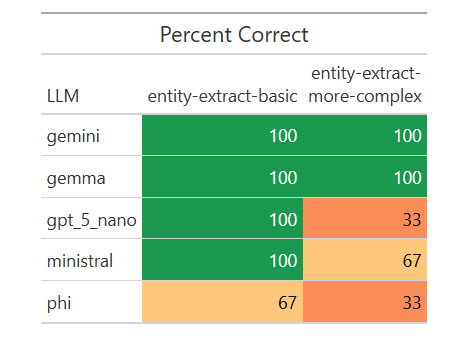
How various LLMs fared on extracting structured data from text.
Sharon Machlis
I was surprised that a local model, Gemma, scored 100%. I wanted to see if that was a fluke, so I ran the eval another 17 times for a total of 20. Weirdly, it missed on two of the 20 basic extractions by giving the title as “R Package Development” instead of “R Package Development in Positron,” but scored 100% on the more complex ones. I asked Claude Opus about that, and it said my “easier” task was more ambiguous for a less capable model to understand. Important takeaway: Be as specific as possible in your instructions!
Still, Gemma’s results were good enough on this task for me to consider testing it on some real-world entity extraction tasks. And I wouldn’t have known that without running automated evaluations on multiple local LLMs.
Conclusion
If you’re used to writing code that gives predictable, repeatable responses, a script that generates different answers each time it runs can feel unsettling. While there are no guarantees when it comes to predicting an LLM’s next response, evals can increase your confidence in your code by letting you run structured tests with measurable responses, instead of testing via manual, ad-hoc queries. And, as the model landscape keeps evolving, you can stay current by testing how newer LLMs perform—not on generic benchmarks, but on the tasks that matter most to you.
