

For all the things I’m endlessly tweaking and fine-tuning on my mobile devices, my Android keyboard app is typically quite constant.
These days, Google’s own Gboard Android keyboard has matured into an accurate, easy-to-use on-screen typing tool that’s packed with advanced input possibilities and time-saving shortcuts. While there are some interesting alternatives for specific needs and purposes, Gboard really has become the best all-around option for most people — something that’s worth remembering is in and of itself a massive advantage over the terrible text input experience on that (cough, cough) other mobile platform.
That’s why I’ve found myself so pleasantly surprised to see how much I’m appreciating a new Android typing app that came out just a mere matter of days ago. It isn’t a keyboard, exactly — rather, it’s all about voice input and giving yourself a better, more effective, and more powerful way to dictate text on your phone, without all the usual asterisks.
I’ve been trying it out for a while now to gain a deeper understanding of how, exactly, it works — and both where it excels and when it falls short.
And man alive, lemme tell ya: It is one heck of an upgrade to the standard Android voice input experience — and a phenomenal supplement to Gboard or any other keyboard app you’re using.
[Get fresh Android-enhancing knowledge in your inbox with my free Android Intelligence newsletter — three new things to try every Friday, straight from me to ye.]
Your Android dictation upgrade
My friend and fellow Android-appreciator, allow me to introduce you to an incredible little creation called Typeless.
The name sums up the app’s purpose brilliantly: The entire concept of Typeless, in a nutshell, is that you won’t have to type on your mobile device — in any traditional, physical manner of speaking — once you start using it.
And while that might not be entirely accurate — I certainly haven’t abandoned Gboard altogether and am deeply skeptical that many people could use Typeless without a regular Android keyboard alongside it, as I’ll explain more in a minute — this thing adds such a practical, useful extra dimension into your mobile text input adventure that you absolutely won’t want to give it up once you get used to having it present.
At its core, Typeless is a big honkin’ microphone button that takes the place of your standard Android keyboard. You tap it and start flappin’ your yap — saying whatever it is you want to compose, without worrying about getting it exactly right and with any amount of as-you-go revisions, corrections, and interjections — and it actually figures out what you’re trying to say and puts it into neatly formatted, cleaned-up text.
JR Raphael, Foundry
Seriously: It. Is. Astonishing. And the voice input built into Gboard and other regular Android keyboard apps, good as it’s gotten in general over the years, doesn’t even come close.
Typeless vs. Gboard: Android voice input face-off
All right — enough oohing and ahhing. Lemme give you a few concrete examples to show ya exactly what I mean:
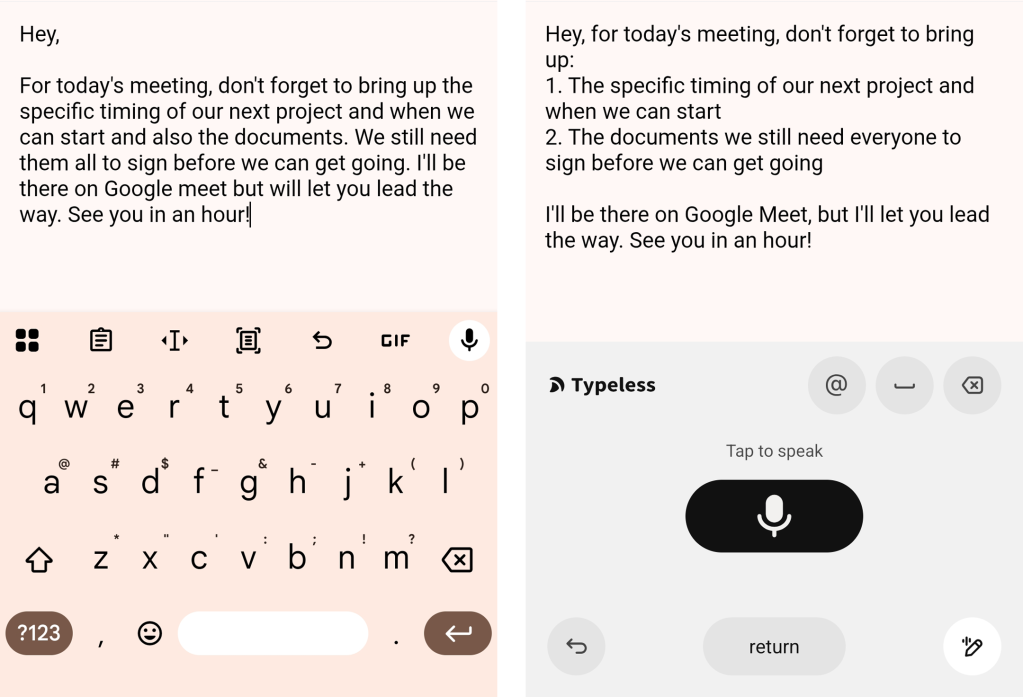
- First, I spoke the following phrase into my phone to dictate an email: “Hey, for today’s meeting, don’t forget to bring up the specific timing of our next project and when we can start and also the documents we still need them all to sign before we can get going. I’ll be there on Google Meet but will let you lead the way. See you in an hour.”
- The regular Android/Gboard voice-to-text system mostly got what I was saying — but it split up a sentence in the wrong spot, missed a proper noun capitalization (of a Google service, no less), and didn’t add in any extra formatting beyond a single line break following the salutation.
- Typeless, in contrast, made the result look like a thoughtfully formatted and actually written email — with a helpful numbered list, proper sentence structuring and punctuation all throughout, and even a quick little correction to my deliberate little grammatical hiccup (major bonus points if you spotted it!).
JR Raphael, Foundry
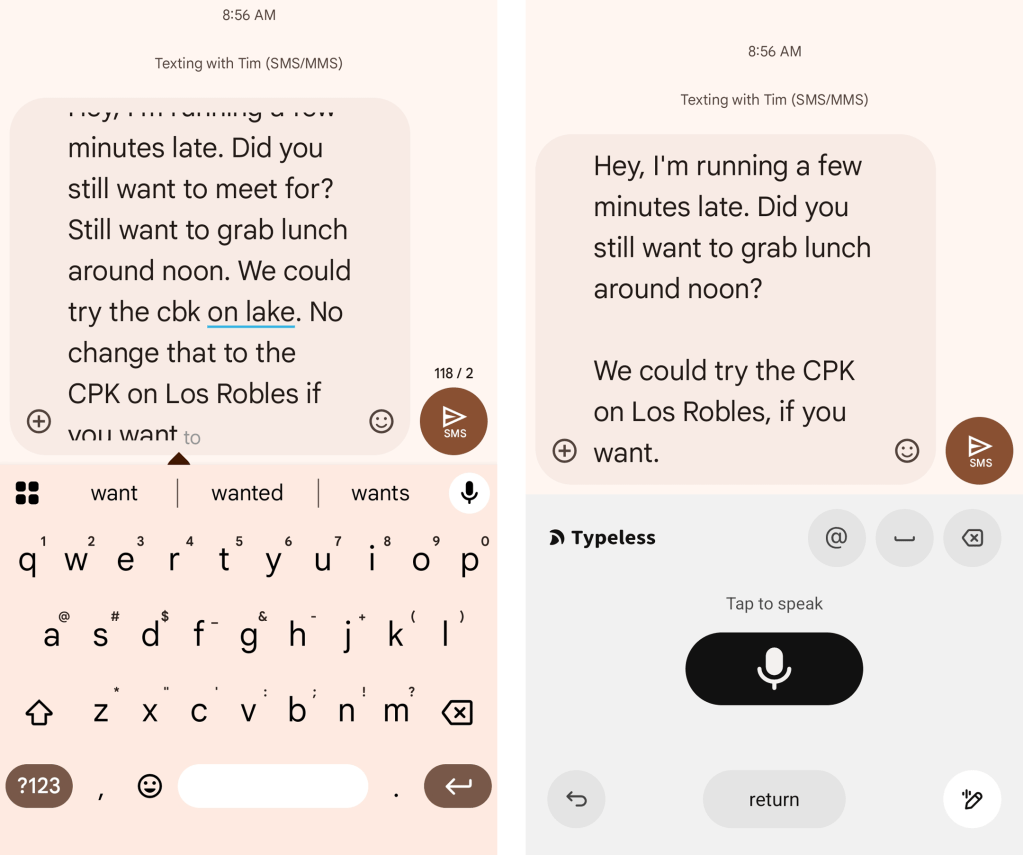
- Next, I dictated a text message where — as so often seems to happen when speaking one’s thoughts aloud — I realized midway through the message that I made a mistake and so tried to correct it. I did that a couple of times, in different ways, to simulate how those sorts of situations might go in reality: “Hey, I’m running a few minutes late. Did you still want to meet for … still want to grab lunch around noon? We could try the CPK on Lake … no, change that to the CPK on Los Robles … if you want.”
- The regular Android/Gboard voice-to-text system couldn’t handle any of my on-the-fly mistakes and corrections, nor did it even get all the sentence structures or specific phrases 100% right.
- Typeless, again, nailed it.
JR Raphael, Foundry
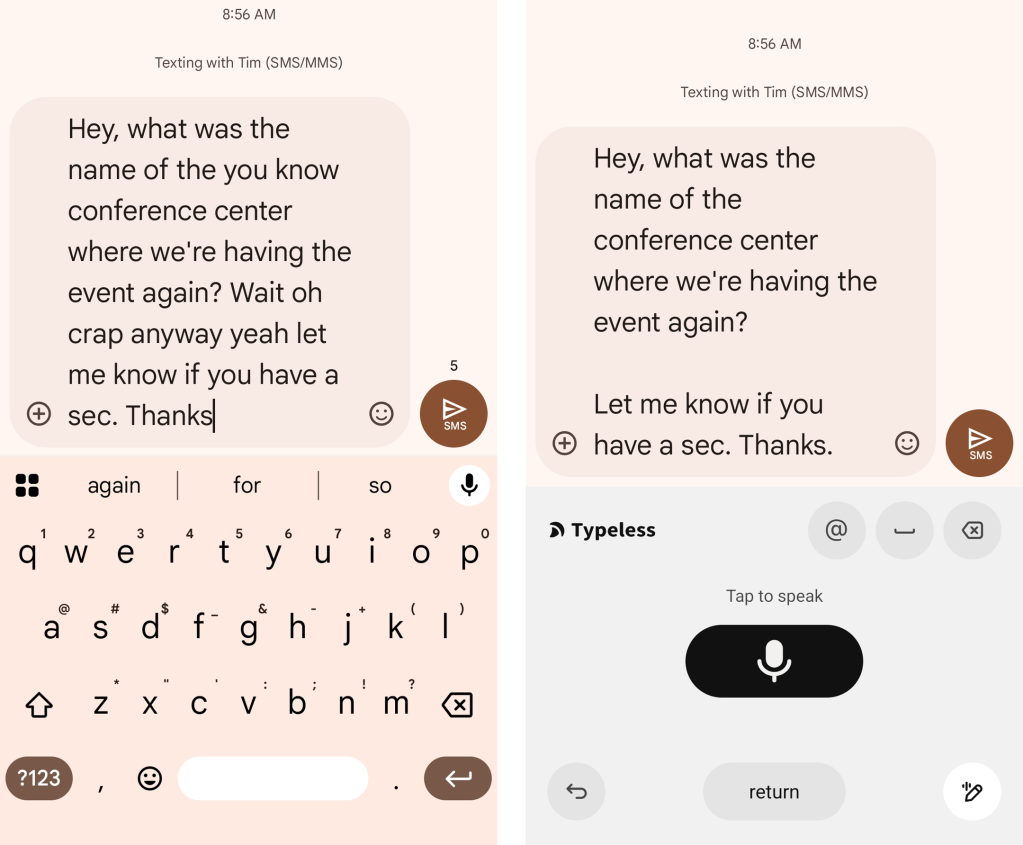
- And finally, I dictated a message where I had lots of “um”-style interjections and mid-speech interruptions: “Hey, uh, what was the name of the, um, you know, conference center where we’re having the event, again? Uhh. Wait. Oh, crap. Um….anyway. Yeah. Let me know if you have a sec. Thanks.”
- Gboard, to its credit, did remove the ums. But that’s it.
- Typeless, on the other hand, completely cleaned up everything and made it look perfect.
JR Raphael, Foundry
You get the idea.
And there’s more.
The bigger Android voice input picture
Aside from all of the foundational advantages we just went over, Typeless will stay open and active for as long as you’re talking — even with long, extended pauses — and only stops when you tap the mic button to let it know you’re finished. It supports spoken punctuation, if you have something specific in mind, but it also will just automatically add in punctuation for you if you don’t call out any particular symbols as you go (and as you can see above, it does a pretty darn good job of figuring out what usually makes the most sense).
Oh, and it even works almost shockingly well with whispered input, which can be quite handy when you want to dictate in a quiet room or public place without being a complete and utter tool who has no common decency. That’s something that Gboard and other more traditional Android voice input mechanisms have never done especially well.
And if you speak multiple languages, it’ll seamlessly detect that and transcribe accordingly as you go, too. Pas mal, eh?
The one awkward caveat with Typeless is that it doesn’t include an on-screen keyboard at all — which is why I suggest it as more of a supplement to Gboard than a full-fledged replacement. There are bound to be times when you want to type without speaking or even just go back and make a minor tweak to something you dictated. Typeless does have an exceptionally good system for doing the latter, and it works impressively well — but still: When you just want a quick ‘n’ simple on-screen editing capability, it doesn’t have a way to make that happen.
Luckily, toggling back and forth between Gboard and Typeless is incredibly easy — at least, if you’re using Google’s standard stock Android interface, as seen on Pixels and other devices where the manufacturer hasn’t meddled much with the software. In such environments, all it takes to switch between the two keyboards is a single tap of the globe icon beneath the keyboard, in the Android gesture area:
JR Raphael, Foundry
Easy peasy, right? That makes it super-simple and natural to use Typeless alongside Gboard and rely on it for all of your voice input while still leaning on Gboard for regular ol’ tappity-tapping.
If you’re using a Samsung device, unfortunately, the process is a teensy bit clunkier and more complicated — but it’s still manageable: You’ll just need to tap the icon with a bunch of tiny dots in the lower-left corner of your on-screen keyboard area, then tap either Gboard or Typeless in the menu that comes up after that to make the same switch.
Typeless is free to use for up to 4,000 words per week — which may well be more than enough for you, depending on how often you’re blabbing into your phone. If you end up hitting that limit, the service offers a paid Pro plan that lifts the limitation (and also includes team-aimed user management) for 12 bucks a month, billed annually — so $144 a year, essentially. But, again, as a casual individual user, there’s a decent chance you’ll never even need that.
As far as privacy goes, the service says it doesn’t retain any dictation-based data, doesn’t use any of your speech for any manner of model training, and always keeps your history on your device and your device only — without anyone else so much as being able to see or access it.
I’m tellin’ ya: Once you give this thing a go, you’ll wonder how you ever lived without it.
Typeless is also available for Windows, MacOS, and iOS, if you’re using other devices alongside your favorite Android gadget. But having it on Android is where it really shines the most — and where it’s the natural Gboard companion and on-the-go dictation upgrade you never knew you needed.
Keep the knowledge coming with my free Android Intelligence newsletter — three new things to try every Friday and my awesome Android Notification Power-Pack as a special welcome bonus.
