


Available as a part of .NET 10, which was released last November, C# 14 brings a plethora of new features and enhancements that make it easier to write efficient, high performant code. Just as we walked through the new features and enhancements in C# 13 and C# 12, in this article we’ll take a close look at some of the best new features in C# 14.
To work with the code examples provided in this article, you should have Visual Studio 2026 or a later version installed in your system. If you don’t already have a copy, you can download Visual Studio 2026 here.
File-based apps
Support for file-based apps is perhaps the most striking new feature in this release of the C# programming language. Until C# 14, we’ve had to follow a multi-step process to run a minimal .cs file. Not only was this a multi-step process, but it incurred significant additional overhead because you had to create a solution file and a project file to run your application. Even if all you wanted to do was perform a quick calculation or process a piece of data quickly to test your code, you had to create additional files you may not need later. No longer.
With C# 14, now you can run a C# file directly from the command line without needing a project or solution file.
Let us understand this with a code example. Consider a file named Demo.cs that contains the following code.
Console.WriteLine("This is a sample text");
DateTime dateTime = DateTime.UtcNow.Date;
Console.WriteLine($"Today's date is: {dateTime.ToString("d")}");
You can execute the program using the following command at the console window.
dotnet run Demo.csWhen the program is executed, you’ll see the following text displayed at the console.
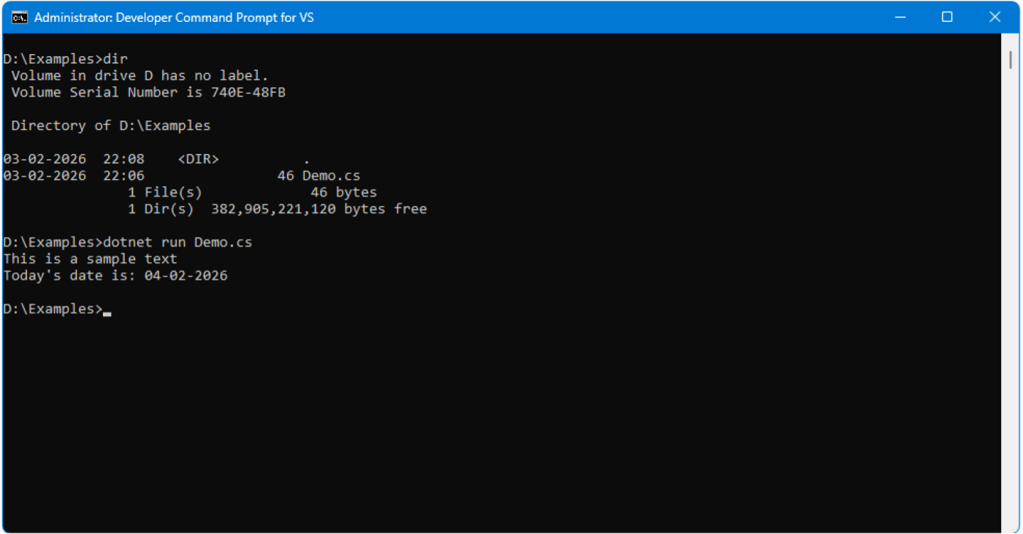
Foundry
Note that you can create file-based apps that reference NuGet packages and SDKs using preprocessor directives, without needing a project or solution file.
Extension members
Extension members are a new feature in C# 14 that let you declare extension properties as well as extension methods. In addition, extension members make it easier to declare extension methods than in previous versions of C#. Before we dive into extension members, let’s first understand extension methods.
In the C# programming language, extension methods are a feature that permits you to augment the capabilities of classes without the necessity of inheritance. You do not need to create subclasses to use extension methods, nor is it necessary to modify or recompile existing class definitions. In addition to improving code readability, extension methods help you add new methods to your existing types (i.e., classes, structs, records, or interfaces). Incidentally, extension methods were first implemented in C# 3.0.
There are numerous extension methods in .NET that allow you to expand the querying capabilities of both System.Collections.IEnumerable and System.Collections.Generic.IEnumerable by using the LINQ standard query operator. While you can take advantage of extension methods to extend a class or an interface in C#, you cannot override their methods. Extension methods can help you to extend the functionality of types even if they are sealed, such as the String class in C#.
For example, the where() extension method is defined in the Enumerable static class pertaining to the System.Linq namespace. The following code snippet creates an instance of the where() extension method:
public static IEnumerable Where(
    this IEnumerable source,
    Func predicate)
Note the use of the this keyword. Prior to C# 14, to implement an extension method, you had to create a static method and pass the this reference as a parameter to the method. In C# 14, the code snippet above can be replaced using an extension block, without the need of specifying the this parameter. This is shown in the code snippet given below.
extension(IEnumerable source)
{
    public IEnumerable
     Where(Func predicate)
}
The ability to define extension members has other advantages as well. Note that an extension member requires two types of information, i.e., the receiver to which the member should be applied and any parameters it might need if the member is a method. With the new extension member syntax, you can define an extension block and then write the receivers as needed. Most importantly, this new syntax enables you to define a receiver for your extension member that doesn’t require any parameter, i.e., if you’re using an extension property.
Additionally, by using the new syntax, you can logically group extensions that apply to the same receiver. You can then define a new extension block if the receiver changes. Moreover, the static class in which you write your extension blocks or extension methods (if you’re using an earlier version of the C# language) can contain both the extension methods that require the this parameter and the extension members grouped inside extension blocks, as shown in the C# 14 code listing given below.
public static class StringExtensions
{
    extension(string value)
    {
        public bool ContainsAnyDigit()
        {
            if (string.IsNullOrEmpty(value))
                return false;
            return value.Any(char.IsDigit);
        }
        public bool ContainsAnySpecialCharacter()
        {
            if (string.IsNullOrEmpty(value))
                return false;
            return value.Any(c => !char.IsLetterOrDigit(c));
        }
    }

    public static bool IsNullOrEmptyOrWhiteSpace(this string str)
    {
        return string.IsNullOrWhiteSpace(str);
    }
}
In the preceding code snippet, the extension method IsNullOrEmptyOrWhiteSpace uses the legacy syntax (i.e., it requires the this parameter), whereas the extension methods ContainsAnyDigit and ContainsAnySpecialCharacter use the new syntax.
You can read more about extension members in C# 14 here.
Improvements to the nameof operator for unbound generics
C# 14 brings improvements to the nameof keyword by supporting unbound generic types (e.g., List, Dictionary). Now that nameof can take an unbound generic type as an argument, you no longer need to define dummy type arguments (such as List) merely to obtain the type name “List.”
Let us understand this with a code example. In the following piece of code, you’ll need to specify the type argument for the cast to work perfectly.
string typeNameList = nameof(List);
string typeNameDictionary = nameof(Dictionary);
With C# 14, unbound generics work directly. You no longer need to specify the type explicitly, as shown in the code snippet given below.
string typeNameList = nameof(List);
string typeNameDictionary = nameof(Dictionary);
Hence, with C# 14, the following lines of code will work perfectly.
Console.WriteLine(nameof(List));
Console.WriteLine(nameof(Dictionary));
User-defined compound assignment operators
C# 14 comes with support for compound assignment operators. This feature enables you to write code similar to x += y instead of having to write x = x + y, as you do in the previous versions of the language. You can use compound assignment operators in C# 14 to overload +=, -=, *=, /=, %=, &=, |=, ^=, <<=, and >>= operators.
Consider the following code snippet that creates a ShoppingCart class in which the += operator is overloaded.
public class ShoppingCart
{
    public int TotalQuantity { get; private set; } = 0;
    public decimal TotalAmount { get; private set; } = 0m;
    public void operator +=(int quantity)
    {
        TotalQuantity += quantity;
    }
    public void operator +=(decimal amount)
    {
        TotalAmount += amount;
    }
}
The code snippet below shows how you can use the ShoppingCart class.
public class ShoppingCart
{
    public int TotalQuantity { get; private set; } = 0;
    public decimal TotalAmount { get; private set; } = 0m;
    public void operator +=(int quantity)
    {
        TotalQuantity += quantity;
    }
    public void operator +=(decimal amount)
    {
        TotalAmount += amount;
    }
}
Thanks to user-defined compound assignment operators, we get cleaner, simpler, and more readable code.
Set TargetFramework to .NET 10
Naturally, you must have .NET 10 installed in your computer to work with C# 14. If you want to change your existing projects to use C# 14, you will need to set the TargetFramework to .NET 10 as shown in the code snippet given below.
    Exe
        preview
    net10.0
    enable
    enable
You can learn more about the new features in C# 14 here and here.
The C# programming language has improved significantly since its initial release as part of Visual Studio .NET 2002. That was a time when you had to write a lot of verbose code to create C# programs. The new features introduced in C# 14 promise to boost your productivity and help you write cleaner, more maintainable, and more performant code. Whether you’re building an enterprise application, a mobile application, or a web application, this new version of C# provides you with all you need to create world-class contemporary applications.
